
Tabnxt vs Session Buddy
navigating the future of session recovery under Google's strict extension security
For over a decade, Session Buddy has been a beloved companion for Chrome power users. It functions as a secure tab snapshot tool, automatically saving your tabs so you can recover them after a sudden browser crash or computer reboot. However, the introduction of Google's new extension engine standard, Manifest V3, has posed massive issues for Session Buddy's legacy architecture, leading to missing features, search bugs, and save failures for many long-term users. This has led users to seek out more reliable session buddy alternatives.
Tabnxt was built from day one on Manifest V3, offering a modern, feature-rich alternative that avoids the bugs plaguing legacy extensions. Let's compare the features and stability of both tools. In this article, we look at the session buddy manifest v3 chrome challenges and how you can safely save browser sessions without risking data corruption.
“Session Buddy is a classic backup system that struggled with Google's Manifest V3 security update. Tabnxt is a modern tab command center designed to handle modern web security with ease.”
Feature Comparison Matrix
| Feature | Tabnxt | Session Buddy |
|---|---|---|
| Automatic Session Saving | ✓ Yes | ✓ Yes |
| Manifest V3 Compatibility | ✓ Yes (Built natively) | ✗ Legacy port (Known MV3 issues) |
| Cloud Synchronization | ✓ Yes (Pro) | ✗ No (Local storage only) |
| Integrated Tab suspension | ✓ Yes | ✗ No |
| AI-Powered Tab Grouping | ✓ Yes | ✗ No |
| Tab Snoozing | ✓ Yes | ✗ No |
| Modern Sidebar UI | ✓ Yes | ✗ No (Opens in full page tab) |
Key Differences Analyzed
1. Manifest V3 & Security Stability
Google has officially deprecated the older Manifest V2 extension format. Extensions that do not migrate to Manifest V3 are disabled automatically. Session Buddy was forced to port its legacy system to Manifest V3, but because the new architecture limits persistent background scripts, many users have reported that Session Buddy fails to save sessions automatically or corrupts the database. Tabnxt uses a native, event-driven Manifest V3 background service worker, resulting in 100% reliable session recording and zero system overhead. This acts as a reliable session recovery extension.
2. Cloud Sync vs. Local Backups
Session Buddy stores all backup data locally on your computer. If your hard drive fails, or if your browser profile is deleted, you lose your entire session history. Tabnxt provides secure local snapshots, but also allows you to sync your workspaces to the cloud (Pro tier), allowing you to recover your sessions instantly on any computer or operating system, helping you too many tabs Chrome fix issues from any device.
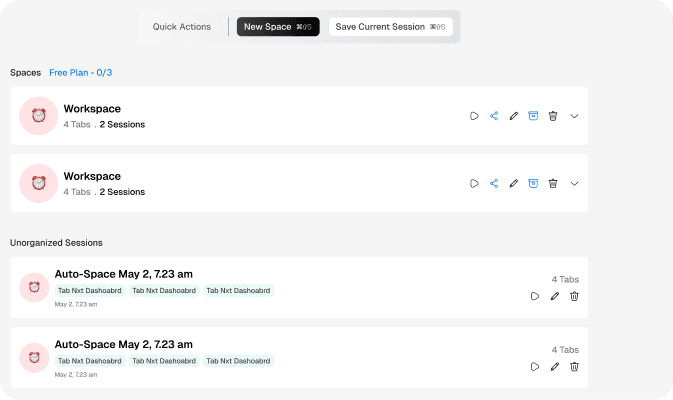
Tabnxt's clean sidebar makes it easy to switch workspaces and restore previous sessions without leaving your page.
3. Tab Snoozing & AI Productivity
While Session Buddy is strictly a recovery database, Tabnxt acts as an active productivity assistant. Tabnxt doesn't just save tabs — it helps you manage them in real-time. You can snooze Chrome tabs, let AI group related pages in one click, and monitor RAM usage in real-time using the built-in Memory Dashboard. It also allows you to reduce Chrome RAM dynamically by suspending background workspaces.
Conclusion: The Verdict
Session Buddy remains a legend in the Chrome utility space. But for users looking for a stable, modern session manager that is fully compliant with modern Chrome security standards, includes cloud backups, and features advanced tab organization tools, Tabnxt is the natural successor. Reclaim your tab backup security and work with speed.