
Tabnxt vs Workona
enterprise-grade workspace management without the enterprise-grade pricing
For professionals managing multiple concurrent client accounts or complex projects, Workona has long been a popular choice. It specializes in "Workspaces" — grouping tabs by project and saving them automatically as you switch tasks. However, Workona's business model has pushed more features behind a steep $8/month paywall, and the extension has become resource-heavy, contributing to browser lag on older computers. This has led many to search for modern free Workona alternatives that offer unlimited local spaces.
Tabnxt offers a modern, lightweight, and affordable alternative built on Google's modern Manifest V3 architecture. Let's compare the two workspace managers to see which is best for your workflow. Under this guide, we will analyze why Tabnxt is the ultimate cheap tab workspaces extension, and how it handles background resources much better.
“Workona is a heavyweight tool built for project managers. Tabnxt is a lightning-fast workspace manager built for the individual professional who wants performance and value.”
Feature Comparison Matrix
| Feature | Tabnxt | Workona |
|---|---|---|
| Workspace Autosave | ✓ Yes | ✓ Yes |
| Free Workspaces Limit | ✓ 3 Spaces (Unlimited Local) | ✗ 5 Workspaces max |
| Tab Suspension (RAM Release) | ✓ Yes (Built-in) | ✗ Requires separate extension |
| AI Tab Grouping | ✓ Yes (Private Local) | ✗ No |
| Snooze Chrome Tabs | ✓ Yes | ✗ No |
| Startup Speed & Performance | ✓ Instant (Manifest V3) | ✗ Heavy (Known boot lag) |
| Pro Pricing | ✓ $2 / month | ✗ $8 / month |
Key Differences Analyzed
1. Pricing: $2/mo vs. $8/mo
Workona's free tier is strictly capped, and unlocking unlimited workspaces, tags, and cloud sync costs $8 per month (billed annually). Tabnxt offers its core workspaces and local storage features completely free, with unlimited local workspaces. Upgrading to the Pro tier for cloud backups, AI grouping, and advanced snoozing costs just $2/month — a fraction of Workona's cost. This makes it a great cheap tab workspaces extension for freelancers and students alike.
2. Tab Suspension & Memory Management
Workspaces naturally encourage you to keep more tabs open in the background. If you switch between 5 workspaces with 15 tabs each, that's 75 tabs consuming system memory. Workona does not include native tab suspension, meaning you have to run a secondary extension (like Auto Tab Discarder) to keep your computer from lagging. Tabnxt integrates its proprietary Memory Dashboard and tab suspension directly into the extension, letting you freeze background workspaces automatically. This helps you reduce Chrome RAM without closing your active tabs, which is a major advantage for computer speed. It also includes integration to snooze Chrome tabs for later recall.
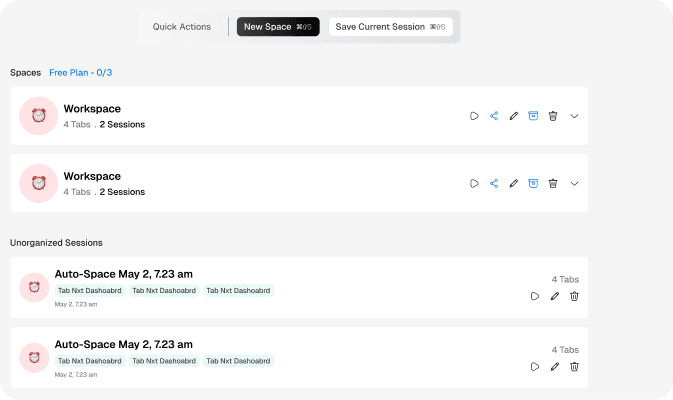
Tabnxt's Workspace Manager keeps your browser lightweight by isolating and freezing background spaces.
3. Extension Weight and Performance
Because Workona syncs massive amounts of metadata, history, and project assets, it consumes substantial browser resources. Many users report that Chrome takes several seconds to open when Workona is active. Tabnxt is built on Chrome's Manifest V3 platform using a streamlined, event-driven background service worker. It starts instantly and uses less than 35MB of RAM to operate. It is the perfect workspace manager chrome free option on the Web Store.
How to Migrate Safely to Tabnxt
If you already have workspaces set up, moving is simple. Tabnxt allows you to export your sessions from Workona as a CSV or JSON file and import them directly into Tabnxt, letting you save browser sessions cleanly. This transition takes less than a minute and completely frees you from Workona's free version limit.
Conclusion: The Verdict
Workona remains a strong option for teams who want to attach documents, tasks, and team comments directly to their browser workspaces. However, for individual developers, designers, and students who want a fast, affordable workspace manager that keeps their browser running smoothly, Tabnxt is the superior option.