
AI Tab Manager Guide 2026
how machine learning is quietly revolutionizing how we interact with the web
The way we browse the internet has remained virtually unchanged for over two decades. We open a browser, type a search, and click links, accumulating tabs until our browser bar is an unreadable mess. Historically, tab managers were nothing more than glorified bookmark organizers — requiring manual drag-and-drop actions, manual group creation, and constant upkeep that users rarely had the time to maintain. If you have a too many tabs Chrome fix situation, sorting them manually is a headache.
But in 2026, artificial intelligence has completely transformed browser productivity. By replacing manual organization with automated, predictive clustering, an artificial intelligence chrome extension like Tabnxt is helping power users reclaim hours of wasted time and gigabytes of system memory. It serves as an elite workspace organizer that handles background management automatically.
“The tab manager of 2026 isn't a folder where you dump links. It's an intelligent assistant that knows what you are working on, categorizes your research, and clears away distractions automatically.”
What is an AI Tab Manager?
Unlike traditional extensions that simply list your open tabs, an AI tab manager uses machine learning algorithms to understand the content and context of your pages. It automatically classifies tabs by topic, predicts which tabs you no longer need active, and groups related tasks together without requiring any manual sorting from the user. Knowing how to reduce Chrome RAM is part of what makes these smart engines so effective: they freeze what you don't need based on your active behavior.
Core Features of 2026 AI Tab Managers
1. Automated Semantic Grouping
Rather than relying on exact keyword matching, modern AI tab managers read the page context to understand themes. If you have tabs open for a flight ticket, a hotel booking, and a travel blog, the AI understands these relate to a "Trip Plan" and automatically bundles them together under a color-coded group. This is the core of smart tab grouping.
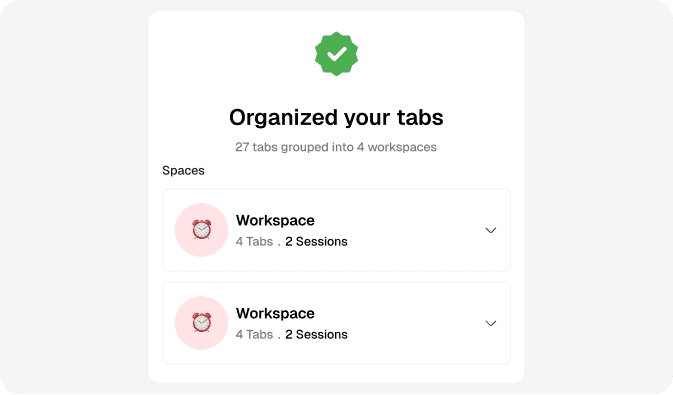
AI Tab Grouping automatically creates clean, labeled workspaces out of messy, unsorted tab bars.
2. Predictive Auto-Suspension
Traditional tab suspenders freeze tabs based purely on a timer (e.g., suspend after 30 minutes). AI-powered suspenders are smarter. They analyze your tab usage history and system memory load to predict which tabs you are unlikely to return to soon — suspending those first to maximize system RAM, while keeping high-priority communications tabs (like Slack or email) awake.
3. Cognitive Context Switching
When you switch from writing code to checking email, your brain suffers a cognitive penalty. AI tab managers help align your browser to your mental state. With features like Tabnxt's Smart Workspaces, you can save browser sessions automatically, and the extension will collapse or archive irrelevant tabs based on your active project, keeping your visual field clean and focused.
How to Get Started with Tabnxt AI
Tabnxt is built from the ground up to leverage lightweight, local AI processing, ensuring your browsing history remains 100% private and never leaves your computer. It ranks as the best tab managers 2026 option because it runs entirely locally without sending data to external APIs.
- AI Grouping: Click the Tabnxt extension and select "AI Group Tabs" (or press ⌘ + 9G). In 3 seconds, all open tabs are organized into custom, context-appropriate groups.
- Auto-Nudge: When you open more than 15 tabs in a single window, Tabnxt's AI will send a subtle, non-intrusive nudge suggesting an automatic group action or a session to snooze Chrome tabs to prevent clutter before it starts.
Conclusion: The Future of Browsing
Browsing in 2026 is about focus and efficiency. By letting artificial intelligence handle the tedious work of sorting, naming, and memory-managing your tabs, you can focus on doing your best work, keeping your browser fast and your mind clear.